The most advanced modding platform for games running on DICE's Frostbite game engine. Unlock unlimited possibilities and transform your gaming experience with professional-grade tools.
Your complete solution for modding Frostbite engine games
Frosty Mod Manager is a free, open-source modding platform designed specifically for games built on DICE's Frostbite engine. Whether you are a casual player looking to enhance your favorite game or an experienced modder creating custom content, Frosty Mod Manager provides all the tools you need in one easy-to-use package.
The platform combines a sophisticated mod manager with a powerful editor suite, giving you complete control over game assets, textures, meshes, sounds, and much more. With support for dozens of popular games including Battlefield, FIFA, Star Wars Battlefront, Dragon Age, and Need for Speed series, Frosty Mod Manager has become the go-to solution for the Frostbite modding community.
Unlike other modding tools, Frosty Mod Manager is built from the ground up to understand the complex structure of Frostbite engine files. This deep integration ensures that your mods work seamlessly with the game, providing stable performance and maximum compatibility.
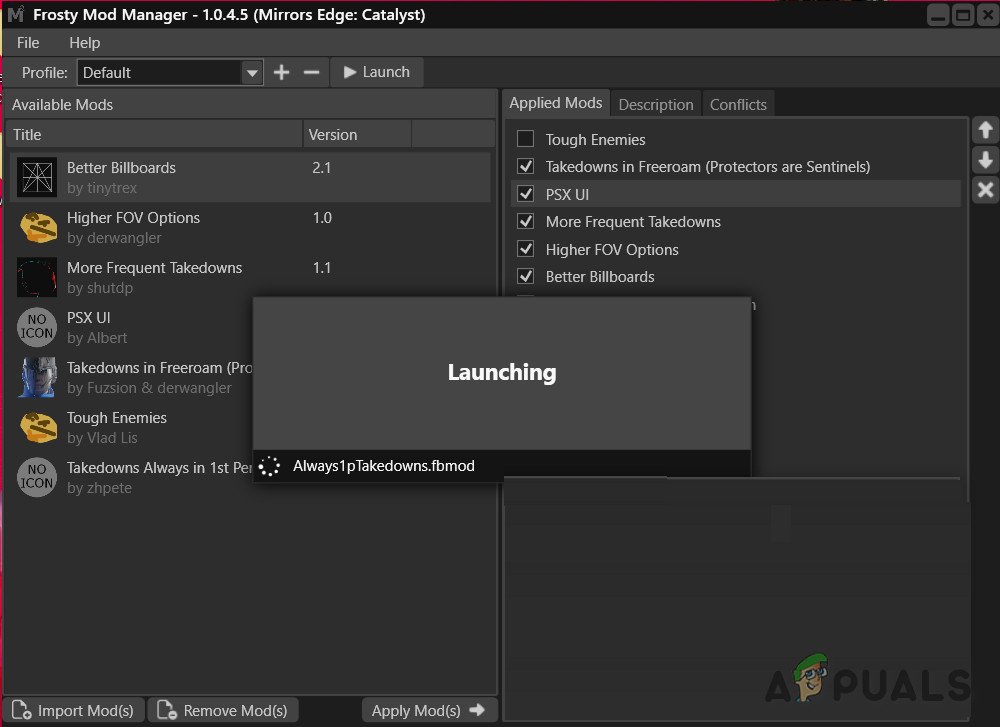
Everything you need for professional-grade modding
Install, enable, disable, and organize your mods with a user-friendly interface. Drag and drop functionality makes mod management effortless. Create custom collections to organize mods by type or preference.
Built-in editors for textures, meshes, sounds, and game data. Import and export assets in multiple formats including PNG, TGA, FBX, OBJ, and more. Full support for 2D textures, texture arrays, cubemaps, and volume textures.
Modify game assets with precision. Edit EBX files, bundle structures, and legacy databases. Support for mesh importing with skeleton support, composite mesh editing, and material modifications.
Replace and customize in-game audio. Support for multiple audio formats including EA Layer 3. Preview sounds before importing and batch export multiple audio files at once.
Extend functionality with custom plugins. The modular architecture allows developers to create specialized tools for specific games or asset types. Access to comprehensive plugin API for advanced customization.
Fast mod loading and application with intelligent caching. Improved performance with TypeInfo and MeshVariation caching. Quick launch times and efficient memory usage even with hundreds of mods.
Browse and search through game files with ease. Advanced filtering and search capabilities help you find exactly what you need. Visual asset previews for textures, meshes, and other resources.
Organize mods into collections for different playstyles or scenarios. Switch between mod sets instantly. Share collections with friends or the modding community.
Non-destructive modding keeps your game files safe. Easy mod removal returns game to original state. Built-in conflict detection prevents incompatible mods from causing issues.
Simple process, powerful results
Step 1: Install Frosty Mod Manager
Download the latest version from our site and run the installer. The setup wizard will guide you through the installation process. Frosty automatically detects supported games installed on your system, making initial setup quick and painless.
Step 2: Add Your Mods
Browse popular modding sites or create your own mods using the Frosty Editor. Simply drag and drop mod files into Frosty Mod Manager. The application automatically organizes and prepares your mods for use. You can enable or disable mods at any time without affecting your game installation.
Step 3: Launch and Play
Click the launch button and Frosty handles everything else. The mod manager applies your selected mods in the correct order, checks for conflicts, and starts your game with all modifications active. When you want to play without mods, simply launch the game normally from your library.
Works with all major Frostbite engine titles
BF1, BF4, BFV, BF Hardline
Battlefront, Battlefront II, Squadrons
FIFA 17, 18, 19, 20
Madden 19, 20
NFS, Payback, Heat, Rivals
Dragon Age: Inquisition
Andromeda, Catalyst
Anthem, Plants vs Zombies
The modding community's trusted choice
Frosty Mod Manager was created by the community to address the unique challenges of modding Frostbite engine games. The development team understands the needs of both mod creators and users, resulting in a tool that serves both audiences perfectly.
The platform receives regular updates to support new games, add features, and improve performance. The latest version includes enhanced plugin support, improved mod applying speed, better texture handling, and support for the newest Frostbite games. Bug fixes and optimizations are released frequently based on community feedback.
Whether you are just starting with modding or creating complex modifications, extensive documentation helps you every step of the way. Tutorials cover everything from basic mod installation to advanced asset editing. The active community forum provides support and shares knowledge.
Frosty Mod Manager is completely free to download and use. The open-source nature means transparency, security, and the ability for talented developers to contribute improvements. No hidden costs, no premium features locked behind paywalls, just pure modding power available to everyone.
Join thousands of modders worldwide who use Frosty daily. Share your creations, get help with problems, and discover amazing mods created by others. The community contributes mods, plugins, tutorials, and support, making the platform better for everyone.
